About me
Hello, I'm MelloMesh.
It's the name I've gone by online for years. Offline, it's Animesh. Same person, same coffee order.
I build things with AI agents. So far that's:
- Dashboards that put the numbers that matter on one screen.
- Finance automations: month-end workflows a real AI runs and a person signs off (videos below).
- Websites, including this one.
I work with a small team of AI agents that build, check each other and wait for my OK on anything that matters. MelloLabs is where I share what worked.
All resources on this website are free. For implementations, websites or other services, reach out at [email protected].
Found a bug or have an idea? Feedback is very appreciated: use the Feedback button on any page.
What I've built
Things I've built with AI agents.
Four kinds of work, each planned, built and checked with two AI coding agents, Claude Code and Codex, reviewing each other. Every AI reply in the videos is real, shortened where marked, and each card has a written version of its video. The code stays private.
Finance automation
Five month-end close workflows on made-up books for Demo Co. A real AI does each one and flags what doesn't tie; a person signs off.
Built with Claude Code + Codex
-
Prepaid reclass
Finds expense lines that are really prepaid and drafts the reclass.
Read the demo for prepaid reclass
The video shows the whole run, start to finish. The job is typed into the Prompt Studio, the prompt is pasted into an AI with the March ledger files, and the AI asks three questions before it starts. It splits an $18,600 insurance policy into $1,550 kept as March expense and $17,050 moved to prepaid, moves a $24,000 annual software renewal to Prepaid R&D, and leaves a line tagged PREPAID as expense because that service happened in March. Reclass totals: US $52,150.00 and UK £20,400.00. The journals balance and nothing is posted. It ends by saving the steps as a reusable skill and a flowchart.
-
Prepaid amortization
Rolls the schedule, ties it to the ledger and catches a broken match key.
Read the demo for prepaid amortization
The video shows the whole run, start to finish. The AI releases US $4,000.00 and UK £1,133.33 for March, rolls the schedule forward and ties each closing balance to the ledger (US $66,300.01, UK £25,483.35). It catches a match key with a trailing space ("PPA-UK-0003 ") that would have broken the tie-out, and says so. The entry balances and nothing is posted. It ends with a reusable skill and a flowchart.
-
Leases and deposits
Drafts the lease entries and holds them on a 212.40 gap.
Read the demo for leases and deposits
The video shows the whole run, start to finish. The AI drafts the lease journals (US total $14,365.18, with a 0.03 rounding line shown on its own), then finds the US long-term lease liability 212.40 off the schedule (363,799.28 against 364,011.68) and a $2,500 security deposit, D-US-03, with no matching lease. It holds the journal until both are explained. It ends with a reusable skill and a flowchart.
-
Fixed assets
Runs depreciation and a disposal, then ties the roll-forward.
Read the demo for fixed assets
The video shows the whole run, start to finish. The AI runs March depreciation (US $704.28, UK £232.57), records one disposal with a loss of $816.74 (cost $2,100 less $1,283.26 of depreciation), and rolls cost forward ($41,000 plus $13,300 of additions less the $2,100 disposal = $52,200) and accumulated depreciation ($11,734.36), each tied to the ledger. It ends with a reusable skill and a flowchart.
-
Bank reconciliation
Reconciles two accounts to 0.00 and lists the open items.
Read the demo for bank reconciliation
The video shows the whole run, start to finish. The AI reconciles two operating accounts to a difference of 0.00. US: the statement $1,217,039.07 plus a $78,455.33 deposit in transit, less two outstanding checks of $4,014.73, equals the ledger $1,291,479.67. UK: £296,037.01 plus £57,148.07 in transit, less one £889.66 check, equals £352,295.42. All 8 payment batches agree to the payment run file. It ends with a reusable skill and a flowchart.
-
Close dashboard
One screen where a reviewer checks every tie-out and signs off.
Read the demo for close dashboard
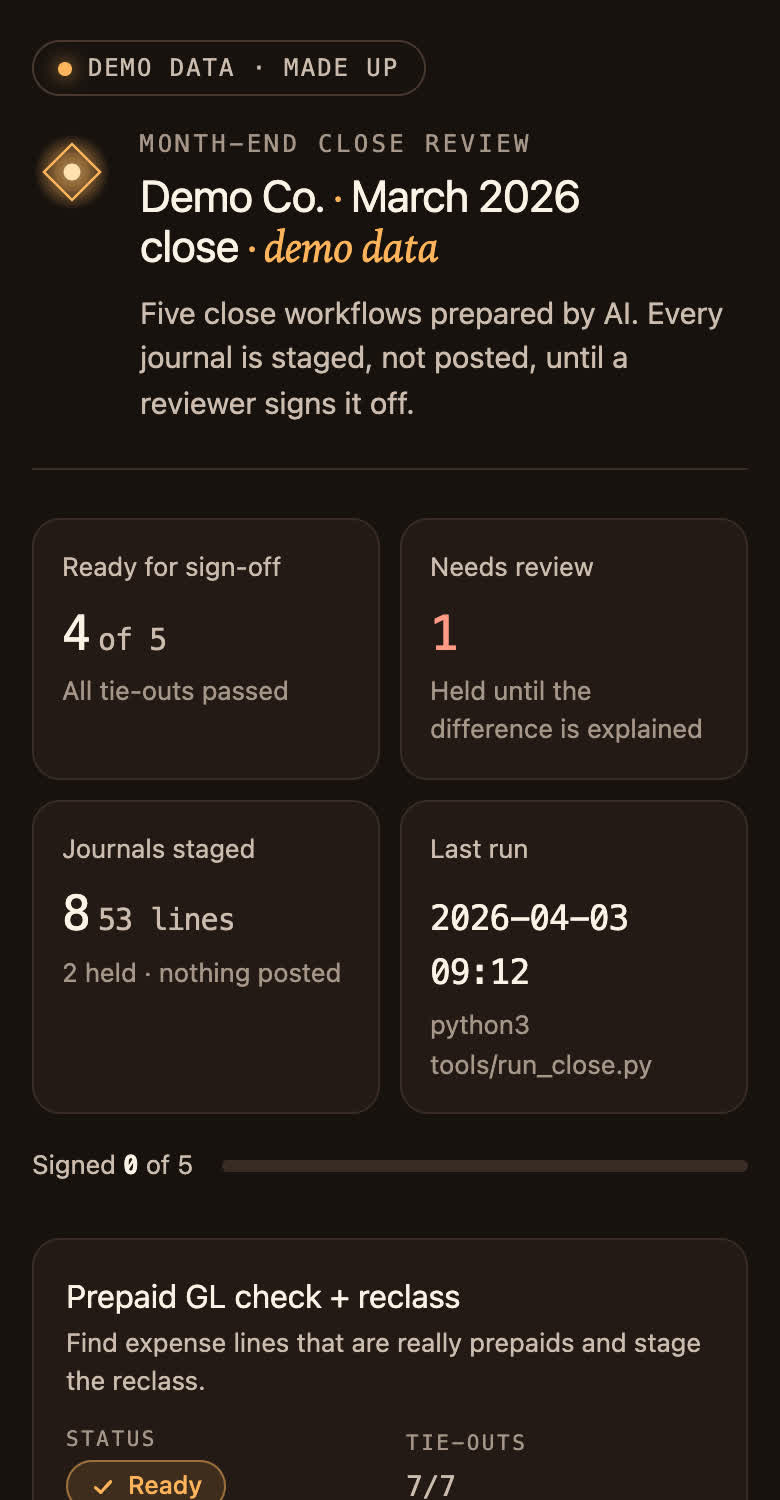
A still of the close dashboard on a phone. Four of five workflows are ready for sign-off and one is held until its difference is explained. Eight journals are staged with 53 lines, and nothing is posted. Each workflow row shows its tie-outs, the difference and a sign-off button.
Websites
My own site, plus five design studies shown with demo names. Not client work.
Built with Claude Code + Codex
-
MelloLabs.io (this site)
My own site: free prompts, kits and a learning path, built and checked by AI agents.
Read the demo for MelloLabs.io
A short tour of this site, with captions on screen and no sound. A job is typed into the Prompt Studio the way you would say it, two quick questions are answered, and the prompt builds itself and is copied in one click. Then the library, filtered to kits and searched for a job; Learn, the hub for The Path, the guides and Lab Notes; a quest on The Path and a word in Lab Notes; and About me. Nothing is blurred: this one is mine.
-
Tile company concept
Project photos, then the layers under a tiled shower.
Read the demo for tile company concept
A design study for a tile installer, shown with a demo name, Demo Tile Co. The tour opens on finished tile and a row of projects, filters them by room, explains the services and what goes under the tile, then shows a short estimate form and a text option. The name, contact details and places were swapped for demo ones; the tile photos are the installer's own, shown with permission. Nothing is sent from the study.
-
HVAC concept
A No heat / No AC switch that changes the whole page.
Read the demo for HVAC concept
A design study for a heating and air conditioning company, shown with a demo name, Demo Heating & Cooling. A No heat / No AC switch changes the headline, the picture, the page colors and the icon from a flame to a snowflake. Then a booking card writes the text message for you, and a four-step strip shows how a visit works. The name, contact details, places and pictures were swapped for demo ones, so nothing is blurred.
-
Demolition concept
The building comes apart in six steps as you scroll.
Read the demo for demolition concept
A design study for a demolition and abatement firm, shown with a demo name, Demo Demolition Co. A drawing of a four-storey building comes apart in six steps as the page scrolls: survey, containment, abatement, clearance, demolition and hand back, each with a short explanation. The name, contact details and places were swapped for demo ones, so nothing is blurred.
-
Heating concept
A symptom dial that moves a thermal camera view.
Read the demo for heating concept
A design study for a heating and cooling company, shown with a demo name, Demo Heating Co. The page opens on a thermal camera view of a house that warms up room by room. Turning a symptom dial (on, off, on; high bills; no cooling) moves the camera to where that trouble usually sits, with what is safe to check and whether to call. Then the offers. The name, contact details and places were swapped for demo ones, so nothing is blurred.
-
Contractor concept
A schedule board that redraws for each kind of job.
Read the demo for contractor concept
A design study for a general contractor, shown with a demo name, Demo Builders. As the page scrolls, a schedule board fills in phase by phase, showing where the owner decides and where updates come. Picking another project type (kitchen, attic) redraws the board. Then a section for two kinds of client. The name, contact details and places were swapped for demo ones, and testimonials, ratings and founding details were left out, so nothing is blurred.
AI products
Things people can use to work with AI themselves.
Built with Claude Code + Codex
-
MelloLabs Prompt Studio
Describe a job in plain words and get a prompt for your own AI.
Read the demo for MelloLabs Prompt Studio
The Prompt Studio on this site. A job is typed in plain words, the Studio writes the prompt, and it is copied and pasted into an AI with sample files. The AI asks up to three questions before it starts. Sample data.
Keep going
More free resources.
Tell me what your days look like.
I'll help you find where AI could bring in more business first, then where it could take work off your plate.
[email protected]Couldn't find what you needed, or something here didn't work? Tell me what was missing. I read every message.